Command line
| Command | What it does |
|---|---|
workflow-render export <file.json> -o <out.svg|out.png> [--scale N] | Render a workflow or an execution to SVG or PNG |
workflow-render view <file.json> [--port N] | Open the file in the browser viewer |
workflow-render --version | Print the version |
workflow-render --help | Print usage |
export
workflow-render export workflow.json -o workflow.svg
workflow-render export workflow.json -o workflow.png --scale 3
- The output format follows the file extension:
.svgor.png. --scale Nsets the PNG size multiplier. The default is2. It is an error with an.svgoutput.- The SVG is self-contained. Icons are inlined and fonts are embedded, so it looks the same in a browser, an
<img>tag or a file preview. - The same input always produces the same SVG, byte for byte.
Export every workflow in CI
for f in workflows/*.json; do
  npx workflow-render export "$f" -o "renders/$(basename "${f%.json}").png"
done
view
workflow-render view workflow.json
workflow-render view execution.json --port 4777
Expected output:
workflow-render viewing execution.json
  http://127.0.0.1:4777/
Press Ctrl+C to stop.
- The viewer binds to
127.0.0.1only. - Without
--port, it picks a free port.
Executions
Give view or export an execution instead of a workflow and the canvas shows the run.
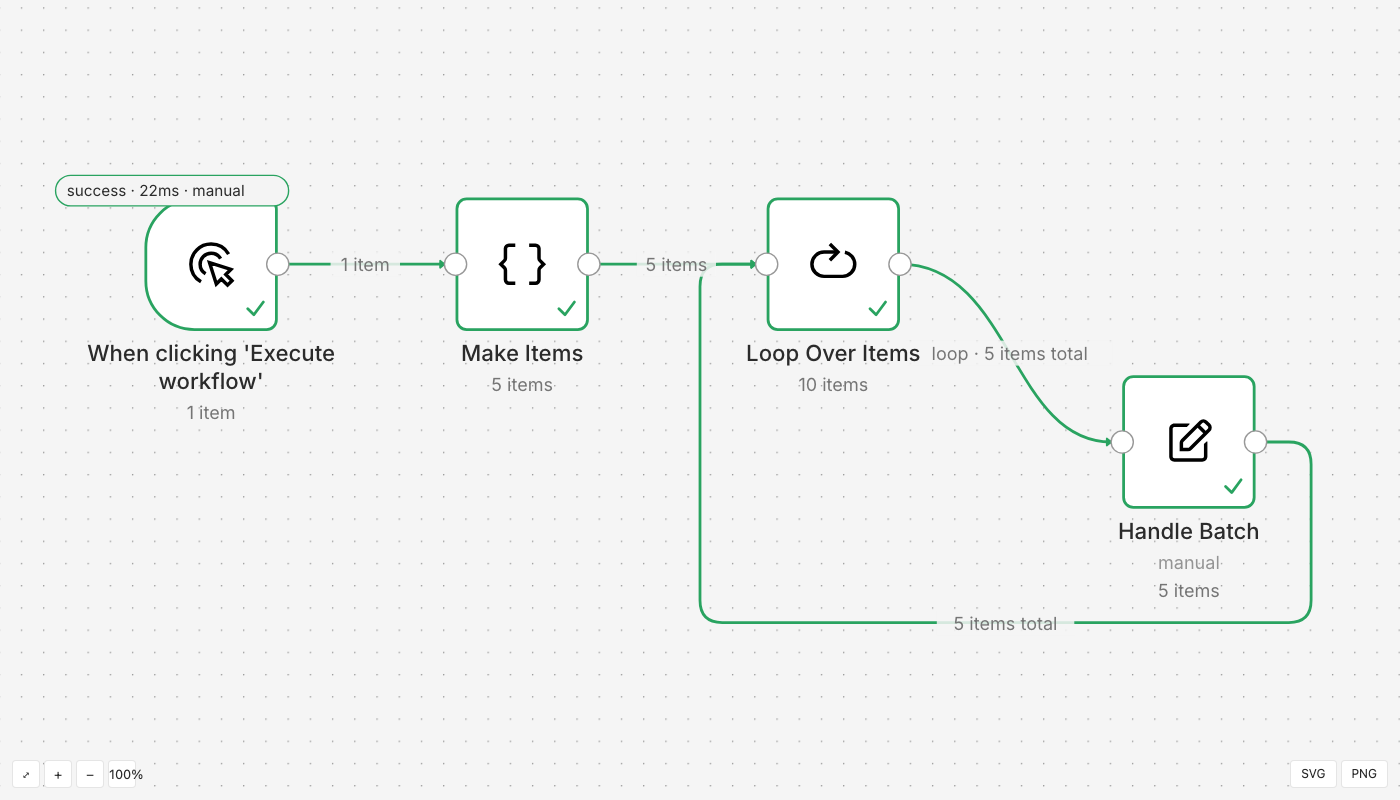
- Executed nodes take the status colour.
- Edge labels carry the item counts.
- Double-click a node to open the inspector: input, parameters and output, with Schema, Table and JSON views.
- A failed node shows its error and stack.
- Binary data is named, never fetched.
Exit codes and warnings
| Exit code | Meaning |
|---|---|
0 | The file was written, or the viewer stopped normally |
1 | The input could not be read, or is not a workflow or execution |
2 | Usage error, such as an unknown flag |
Warnings go to stderr, prefixed warning:. The file is still written.
workflow-render export dangling.json -o dangling.svg
Expected output:
wrote dangling.svg
warning: connection to unknown node "Ghost" dropped
Getting the JSON out of n8n
| What | How |
|---|---|
| A workflow | In the editor, open the … menu and choose Download, or call GET /api/v1/workflows/:id |
| An execution | Save the response of GET /api/v1/executions/:id?includeData=true |